A practical, brand-neutral guide to reefer container maintenance: refrigeration checks, condenser care, humidity and airflow, documentation, and when to call a technician.
Refrigerated shipping containers (reefers) are built to hold temperature-sensitive cargo across long supply chains, but they are not maintenance-free. A reefer that runs inefficiently, cycles too often, or loses its temperature setpoint can put a load at risk and shorten the unit's service life. This guide explains what routine reefer care generally involves, what you can inspect yourself, and where professional refrigeration service should take over. Always confirm the exact specifications, controller model, and service requirements for your specific unit with the Newport team and the equipment documentation that ships with it.
What Makes Reefer Maintenance Different From Dry Container Care
A standard dry container is essentially a steel box. Maintenance is mostly about keeping it dry, clean, and structurally sound. A reefer adds a refrigeration system, an insulated envelope, a controller, sensors, and often a data recorder. That changes the maintenance picture in three important ways.
You are maintaining a refrigeration machine, not just a box
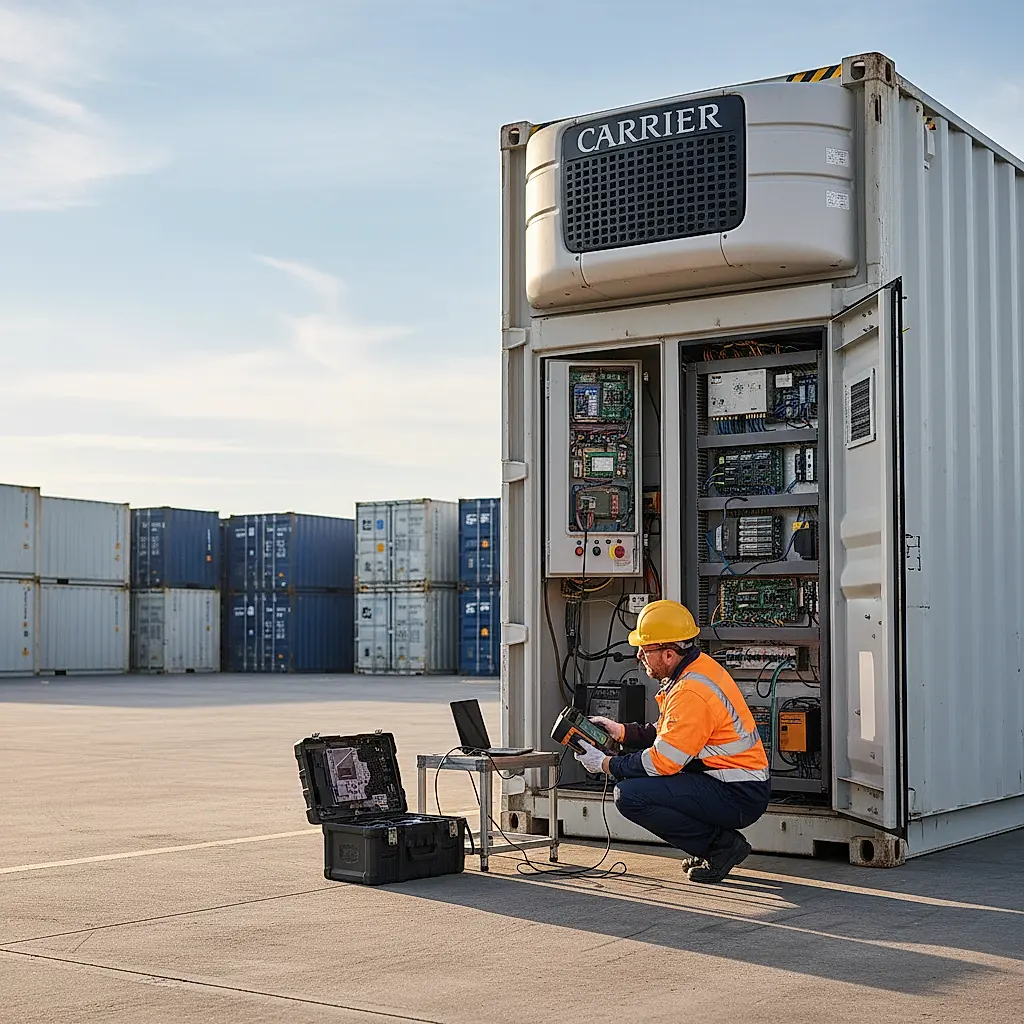
The refrigeration circuit contains a compressor, condenser, evaporator, expansion device, refrigerant, and controls. These components have service intervals, wear parts, and diagnostic procedures that belong to the equipment manufacturer. Refrigerant handling is also regulated, and in the United States it is generally restricted to certified technicians. If you are not trained and certified for the refrigerant in your unit, do not open the circuit.
The insulated envelope matters as much as the machinery
A reefer's performance depends on door gaskets, insulation integrity, and panel seals. A worn gasket or a damaged panel lets warm, moist air into the box. The refrigeration unit then works harder, and cargo near the door may see temperature swings. Gasket and seal inspection is one of the highest-value tasks an owner can do.
Documentation is part of maintenance
Reefers often carry a CSC plate and equipment data plates, and many have controller logs or download ports. Recording setpoints, alarm codes, and service dates helps you spot trends and gives technicians a head start. It also supports any warranty or service discussion. Confirm what documentation your specific unit includes with Newport before you rely on it.
Routine Inspection Checklist for Reefer Owners
This checklist covers the tasks that are typically reasonable for an owner or site operator to perform. It is not a substitute for the manufacturer's service manual or for a qualified refrigeration technician. If any step requires opening panels, working near electrical components, or handling refrigerant, stop and arrange professional service.
Exterior and structural checks
- Walk the container and look for dents, corrosion, or impact damage, especially around the refrigeration unit and door frame.
- Check the door hinges, locking bars, and hardware for smooth operation.
- Inspect the door gasket for cracks, compression set, tears, or debris that prevents a seal.
- Confirm the container sits level and stable on its foundation or corner supports.
- Look for standing water, pest activity, or vegetation around the unit that could restrict airflow.
Refrigeration unit visual checks
- With the unit powered down and locked out per your site procedures, look at the condenser coil for dust, lint, leaves, or insect nests.
- Check that the condenser fan and evaporator fan blades are intact and free of obstructions.
- Look for oil staining, frost patterns, or ice buildup that seems unusual.
- Confirm the controller display powers up and shows the expected setpoint and any active alarms.
- Note any unusual noise, vibration, or short-cycling when the unit runs.
Airflow and humidity observations
- Keep the evaporator return air path clear. Cargo stacked against the evaporator restricts airflow and can cause uneven temperatures.
- Use pallets or dunnage to maintain an air gap under and around the load where the unit's design calls for it.
- If you monitor humidity, record readings at consistent times and locations so trends are meaningful.
- Watch for condensation, dripping, or frost where it should not be.
Record keeping
- Log the date, ambient conditions, setpoint, and any alarm codes at each inspection.
- Keep a folder of service invoices, parts replaced, and technician notes.
- Photograph damage or unusual conditions before and after any repair.
Condenser and Evaporator Care: The Parts Most Often Neglected
Heat has to leave the box. The condenser rejects heat to the outside air, and the evaporator absorbs heat from inside the box. If either coil is blocked, the whole system suffers.
Why condenser cleaning matters
A dirty condenser raises the compressor's workload. In practical terms, that can mean longer run times, higher energy use, and more stress on the compressor. In dusty or leafy environments, coils can foul faster than owners expect.
Safe cleaning approach
- Isolate power using your site's lockout/tagout procedure before touching the unit.
- Remove loose debris by hand or with a soft brush. Do not use a wire brush on coil fins.
- Use the cleaning method and products specified by the equipment manufacturer. Some coils tolerate water rinsing; others require specific coil cleaners. Confirm before you spray anything.
- Avoid bending fins. If fins are crushed, a fin comb may help, but badly damaged coils should be assessed by a technician.
- Let the unit dry appropriately before restoring power, following the manufacturer's guidance.
Evaporator and drain considerations
- Keep the evaporator free of ice and debris.
- Confirm the drain path is clear so defrost water leaves the box.
- Do not chip ice with sharp tools; you can puncture the coil.
- If defrost cycles seem abnormal, document the pattern and call for service.
A note on cleaning chemicals
Reefers carry food, pharmaceuticals, flowers, and other sensitive cargo. Residues from cleaning products can affect cargo. Use only products approved for your application, and rinse or ventilate as directed. When in doubt, ask the Newport team what is appropriate for your unit and use case.
Controller Settings, Alarms, and Humidity Monitoring
The controller is the interface between you and the refrigeration system. Understanding it helps you catch problems early.
Setpoints and modes
Reefers typically support temperature setpoints and may offer modes such as continuous run or cycle-sentry style operation. The right choice depends on cargo, ambient conditions, and the equipment's capabilities. Do not assume a setting is correct because it worked for a different load. Confirm recommended settings with your cargo's requirements and the unit documentation.
Reading alarms
Alarm codes are diagnostic clues. Write down the exact code, when it appeared, and what the unit was doing. Common categories include temperature deviation, sensor faults, power issues, and defrost problems. Do not clear an alarm without understanding it; a recurring alarm usually points to a developing issue.
Humidity monitoring
Some reefer units and controllers support humidity monitoring or control, and some cargoes need it. If you monitor humidity, place sensors where they represent the cargo environment, not just the door area. Record readings consistently. If humidity is outside your target range, check door seals, door openings, and airflow before assuming the refrigeration system is at fault.
Power quality and supply
Reefers depend on a stable power supply. Voltage swings, undersized cables, or poor connections can cause nuisance alarms and compressor stress. Have a qualified electrician verify your supply and plug configuration. Confirm the required power characteristics for your specific unit with Newport and the equipment data plate.
When to Call a Refrigeration Technician
Some tasks belong to trained professionals. Arrange service when you observe any of the following:
- Refrigerant leaks, oil staining, or a circuit that will not hold pressure.
- Compressor noise, failure to start, or repeated overload trips.
- Persistent alarms that return after a reset.
- Ice buildup that defrost cycles do not clear.
- Controller or sensor faults that affect temperature control.
- Any electrical work beyond visual inspection.
- Structural damage to the refrigeration unit or its mounting.
Ask the technician to document findings, parts, and refrigerant handling. Keep that record with your maintenance log. If your unit is under any warranty or service agreement, confirm coverage terms before authorizing work.
Frequently Asked Questions
How often should a reefer container be serviced?
Service intervals depend on the equipment manufacturer, how hard the unit works, and the environment. A unit running continuously in a dusty yard may need attention more often than one used occasionally in a clean location. Use the manufacturer's recommended schedule as your baseline, and increase inspection frequency when conditions are harsh. Confirm the schedule for your specific model with Newport and your service provider.
Can I clean the condenser coil myself?
Visual inspection and removal of loose debris are often reasonable owner tasks when power is properly isolated. Cleaning chemicals, coil rinsing, and any work inside the refrigeration unit should follow the manufacturer's instructions. If you are unsure about the correct method or product, have a qualified technician handle it. Damage from improper cleaning may not be covered by any warranty.
What does a temperature alarm mean?
A temperature alarm means the box temperature has moved outside the expected range or the controller cannot verify it. Causes range from a door left open to a sensor fault or a refrigeration problem. Record the code and conditions, check the door and airflow first, and call for service if the alarm persists. Do not assume the cargo is safe just because the alarm clears.
Do reefer containers need humidity control?
Not all cargoes require humidity control, and not all units support it. Whether you need it depends on what you are storing or shipping. If humidity matters for your cargo, confirm your unit's capabilities and monitoring options with Newport before you commit to a setpoint strategy.
Is a reefer container worth maintaining if I only use it seasonally?
Seasonal use still benefits from maintenance. Gaskets dry out, coils collect debris, and electrical connections can corrode during idle periods. A pre-season inspection and a post-season check help you avoid surprises. Store the unit with the door closed, the interior clean and dry, and the unit protected from standing water.
Next Steps: Get the Right Reefer and the Right Support
Reefer maintenance is a mix of simple habits and professional service. Inspect what you can see, document what you find, keep coils and seals in good condition, and bring in a qualified technician for refrigeration and electrical work. That approach protects your cargo and your investment.
If you are shopping for a refrigerated container, start by reviewing current listings and confirming the equipment details, controller type, and documentation for each unit. Browse available units at our shop. If you have questions about a specific container, site power, or delivery planning, contact the Newport team and we will help you confirm the details before you buy.
Plan the next step
Confirm the container and the delivery plan.
Browse current listings, then speak with the Newport team to verify the unit, total pricing, site access, and delivery requirements before payment.